The Mabinogi lazy patch is a community-developed update method that downloads only game files that have genuinely changed since your last session, instead of forcing a full verification sweep across the entire client. It is built on the computing principle of “lazy evaluation” do the minimum necessary work to reach a valid result. The official Nexon launcher supports a version of this through progressive downloading. Using it correctly can cut routine patch wait times from 30–60 minutes down to under five minutes for most weekly updates.
What Is Mabinogi Lazy Patch?
The Mabinogi lazy patch is a selective update method used by players of Mabinogi the long-running fantasy MMORPG published by Nexon that downloads only the specific game files that have changed since the last update, rather than running a full verification sweep of every file in the client. It is a community term, not an official Nexon feature name, and it has two distinct applications: one technical, one gameplay-focused.
How Mabinogi Lazy Patch Works
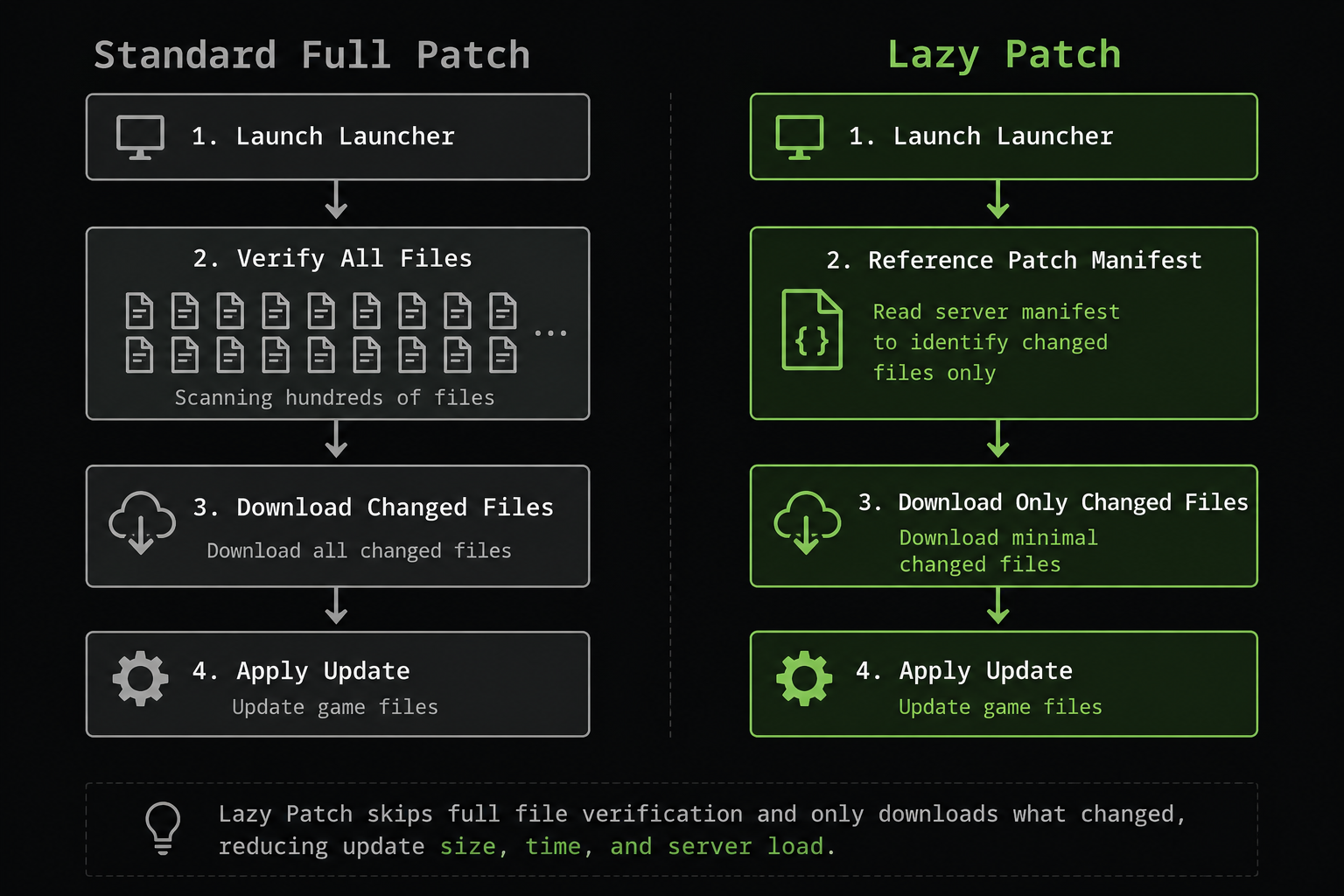
When you run the default Nexon launcher, it performs a complete integrity check comparing every local game file against the server’s reference copy before downloading anything new. The lazy patch approach skips this full-sweep verification and references only the patch manifest: a server-side list that records which files are actually new or modified in the latest update. The launcher then downloads and applies only those files. A routine update that might otherwise require verifying thousands of unchanged files can complete in a fraction of the usual time.
The term “lazy” is a computing term, not an insult. In software engineering, “lazy evaluation” describes a system that defers or limits work to exactly what is necessary to produce a valid result. Applied to game patching, it means: don’t re-download what hasn’t changed, don’t re-verify what’s already clean, fetch the new content and move on.
Who Uses the Mabinogi Lazy Patch
Three groups of players actively seek the lazy patch method. Casual players with limited daily sessions who cannot afford to spend a third of their playtime watching a progress bar. Players in regions with slower internet connections or data-capped plans, for whom a multi-gigabyte full verification is a real financial and time cost. And veteran players who log in multiple times per week and treat the lazy patch as routine maintenance the same way a developer would only rebuild the modules that changed in a codebase, rather than recompiling everything from scratch.
Why Mabinogi Lazy Patch Matters in 2026
Mabinogi was originally developed by devCAT Studio and launched in South Korea in 2004, reaching North American players through Nexon America in 2008. Over more than two decades of content updates organized into “Generations” and “Seasons,” the game client has grown substantially. A routine patch that measured 50 megabytes in 2010 can now run into multiple gigabytes, depending on what changed. Meanwhile, Nexon announced the Mabinogi Eternity project in 2023 a full engine upgrade to Unreal Engine 5 which is currently in active development with a closed battle test held in December 2025. That transition will eventually reshape how patching works entirely, making 2026 a pivotal year to understand and use the lazy patch correctly before the architecture changes.
How the Mabinogi Lazy Patch Actually Works
The lazy patch works by instructing the launcher to reference the patch manifest instead of scanning your entire local installation. The manifest is a server-side index that records exactly which files changed in the most recent update. Instead of comparing every one of your local files against the server’s full reference copy which is what a standard integrity check does the launcher reads the manifest, identifies the new or modified files, and downloads only those.
Think of your game install as a warehouse full of thousands of boxes. A full patch sends an inspector to open and check every single box before touching anything. The lazy patch sends a worker straight to the loading dock with a list of which boxes arrived today and replaces only those.
On Nexon’s modern launcher, this concept exists in a form called progressive downloading. The launcher prioritizes critical game files first, allowing you to enter the game while remaining assets download in the background. This is the safest and officially sanctioned version of the lazy patch philosophy, and it does not require downloading any third-party tool.
For players on fast SSDs and broadband, a standard patch that involves a full file check might add 10 to 20 minutes of dead time. For players on mechanical hard drives or slower connections, that same verification can take 30 to 60 minutes before a single new file is downloaded. The lazy patch method collapses that wait to the time it takes to transfer only the new data often under five minutes for routine weekly patches.
The gameplay side of the term refers to something different: quality-of-life improvements introduced through official Nexon patches that reduce manual grinding. Reduced skill training requirements, pet automation systems, smarter inventory management, and faster travel options have all been referred to by the community as “lazy patch” changes updates that let you enjoy the game without repeating the same actions for hours. Both meanings share the same underlying principle: stop doing unnecessary work.
You May Also Read: Adswynk com: Link Shortener That Pays CPM Ads Earnings and Risk Explained
Mabinogi Lazy Patch vs. Full Patch Which Should You Use?
Most players use the lazy patch by default for weekly maintenance updates and switch to a full patch only when circumstances require it. The table below breaks down the real differences between both methods.
| Feature | Mabinogi Lazy Patch | Full Standard Patch |
|---|---|---|
| Update Scope | Downloads only changed files | Verifies and downloads all files |
| Typical Wait Time (Routine Update) | 2–8 minutes | 20–60 minutes |
| Bandwidth Used | Minimal (new content only) | High (full verification scan) |
| Risk of Update Errors | Lower (fewer files touched) | Slightly higher during heavy server load |
| Best For | Weekly patches, minor content drops | First install, post-absence return, major Generations updates |
| Official Support | Yes (via progressive download setting) | Yes (default launcher behavior) |
| File Integrity Assurance | High for changed files | Complete for all files |
| Compatible with Nexon Terms of Service | Yes | Yes |
| Recommended for Returning Players | No use a full patch instead | Yes |
The lazy patch suits players who log in regularly and whose game client is already stable and up to date. It is not the right choice after you have been away from the game for several months. Major content drops Generation updates, Season launches, and engine-level changes include structural file modifications that can cause problems if the lazy patch skips verification of files that have indirectly changed.
The guidance from veteran players in the Mabinogi World Wiki and community Discord servers is consistent: use lazy for routine updates, use full for anything after a long break or a major patch cycle. That discipline alone eliminates most patching errors.
If you are returning after a gap of two or more months, run a full repair first. The few extra minutes are worth more than the troubleshooting you would otherwise face.
How to Use the Mabinogi Lazy Patch Step by Step
Using the lazy patch correctly means working through the Nexon launcher’s own settings no third-party download required. Here is the process that experienced players follow.
Step 1: Open the Nexon Launcher. Launch through the official Nexon client. Ensure you are signed in to your account before proceeding.
Step 2: Locate the Settings or Options panel. Inside the launcher, navigate to the settings for Mabinogi specifically, not the global launcher settings. Different launcher versions label this section differently look for “Game Settings,” “Update Options,” or “Patch Settings.”
Step 3: Select the selective or quick patch mode. Look for an option that limits file verification to changed files only, or that enables the progressive download feature. This is the lazy patch configuration built into the official launcher. If you see a toggle for “Full File Check” or “Integrity Verification,” disabling it activates the lazy patch behavior.
Step 4: Run the update and monitor the download size. If the lazy patch is working, a routine update will show a significantly smaller download total often just a few megabytes for weekly content patches. If it shows several gigabytes for a minor patch, the full verification is still running.
Step 5: Launch the game normally once the update completes. No additional steps. The game loads with the updated files already applied.
When you cannot find a selective patch setting: Some launcher versions have removed or renamed these options. In that case, the community-documented alternative is to ensure your game installation is clean and complete, then allow the launcher to run its standard update after a small patch cycle. The verification will be shorter when fewer files have actually changed.
Is the Mabinogi Lazy Patch Safe?
The answer depends entirely on which version of the lazy patch you are using. There are two very different safety profiles, and conflating them is how players make costly mistakes.
The official launcher progressive download method is completely safe. It uses no third-party software, modifies no game files outside the normal update process, and does not interact with Nexon’s anti-cheat system, GameGuard. It is simply a configuration of the official client. Using it does not violate Nexon’s Terms of Service in any way. This is the method described in this guide.
Third-party patch tools carry real risks. Tools like PowerPatcher, which was once a well-known community patcher, are now defunct. Changes to Nexon’s patching process rendered PowerPatcher and similar tools non-functional, and the developer confirmed on the project’s GitHub page that there are no plans to revive it. Other third-party tools that claim to offer lazy patch functionality for Mabinogi in 2026 should be treated with caution. They exist in a grey area regarding Nexon’s Terms of Service, and unverified downloads from unofficial sources risk malware or corrupted game files.
The practical guidance for any player in 2026 is this: the legitimate lazy patch requires no download. If a website is asking you to download a file labeled “mabinogi lazy patch download,” verify the source before touching it. Established community hubs such as the Mabinogi World Wiki and the official Nexon forums are reliable. Random third-party sites are not.
Back up your game folder before applying any patch tool you did not obtain from a trusted community source. Running patching tools as administrator without understanding what files they modify is how game installations get corrupted.
You May Also Read: limebotblog com: Multi-Niche Guest Post Blog That Sells Paid Backlinks Across Niches
What No Competitor Tells You: The Three-Term Confusion Problem
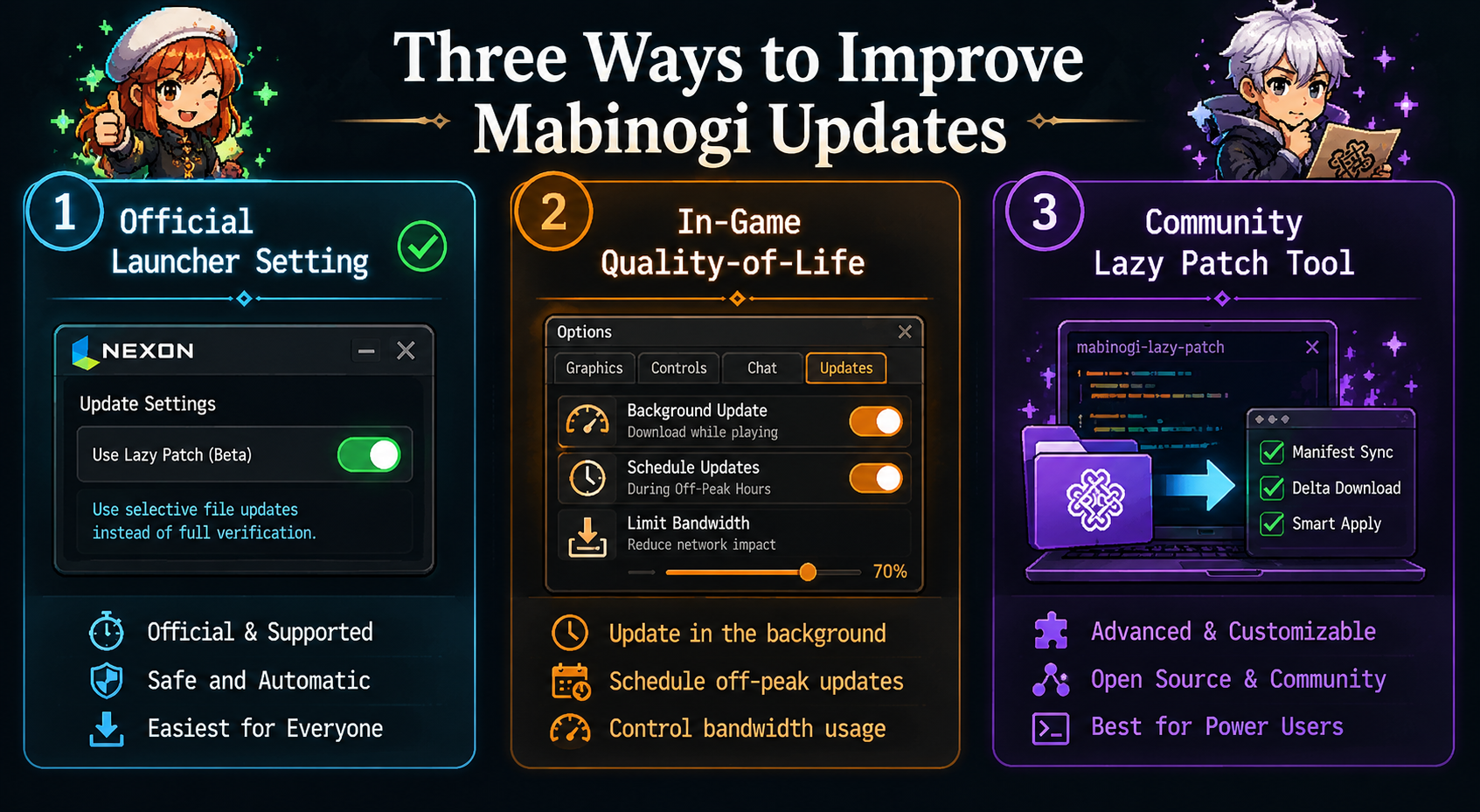
Every existing guide on the Mabinogi lazy patch glosses over the most practically important fact: the phrase “mabinogi lazy patch” is not one thing. It is three separate concepts sharing one name, and which definition applies changes whether your problem gets solved or gets worse. No competitor article addresses this confusion clearly. Most pick one meaning and write around it, leaving readers to figure out which context they actually need.
The Three Definitions and Why They Matter Differently
Definition 1: The official progressive download system. This is what the Nexon launcher does by design on modern installations. It is safe, supported, and requires no user intervention beyond enabling the correct launcher setting. When experienced players say “use the lazy patch,” this is almost always what they mean. The confusion starts because many newer players do not know this feature exists, and they search for a separate tool to download which leads them to Definition 3.
Definition 2: The gameplay quality-of-life meaning. Community forums, particularly Reddit threads and Discord servers, use “lazy patch” to describe Nexon’s in-game updates that reduce grinding: shorter skill training timers, auto-collect features, reduced repetition on daily missions. This usage is entirely separate from patching speed. If someone says “the lazy patch made life skill leveling actually bearable,” they are talking about in-game changes, not the launcher. Conflating this with the technical patching definition causes real confusion when players try to “find the lazy patch” in the launcher settings and cannot.
Definition 3: Third-party patching tools (now mostly defunct). This is the definition that carries actual risk. Third-party tools built by community developers aimed to beat the official launcher’s speed by using delta patching (downloading only the changed bytes within a file, rather than the whole file), improved data caching, and multiple parallel server connections. PowerPatcher was the most notable example. All of these tools are now non-functional or severely outdated, because Nexon’s patching architecture has changed enough to break their compatibility. Despite being defunct, these tools still surface in outdated forum posts and sketchy download sites which is why players searching for “mabinogi lazy patch download” sometimes land on malware-adjacent pages.
Why the Confusion Persists in 2026
Search results for “mabinogi lazy patch” in 2026 pull from articles written at different points in the game’s history, each reflecting a different era of the launcher. An article from 2018 might describe PowerPatcher as a valid option it was, at the time. An article from 2024 might describe the progressive download setting accurate, but using the same name as the defunct tool. A forum post from 2021 might use “lazy patch” to mean a quality-of-life update cycle. All three results appear on the same Google page and use the same keyword, with no clear signal about which definition is in play.
The practical takeaway is straightforward. Before you do anything: identify which definition you are actually dealing with. Are you trying to speed up your update process? Use the official launcher’s progressive download or selective patch setting no download needed. Are you trying to understand what a player meant when they said the game got easier? They mean in-game quality-of-life improvements. Are you looking for a third-party download? Stop those tools are dead, and the download sites that still offer them are not safe.
Mabinogi Lazy Patch Errors and How to Fix Them
The phrase “mabinogi lazy patch error” describes a patching failure not the selective update method itself. When players use “lazy patch” to describe an error, they mean the launcher has stalled, frozen, or thrown an error message during the update process. This is a separate issue from using the lazy patch method, but it is one of the most common reasons players search the term.
Error type 1: Launcher stuck at a low percentage. The progress bar stops moving, usually below 10%. This is almost always caused by a network interruption during file verification or a corrupted partial download. The fix: close the launcher completely, restart your router, and reopen the launcher. If the bar stalls again, use the launcher’s built-in Repair tool, which performs a targeted check of recently updated files rather than a full reinstall.
Error type 2: Antivirus blocking the patch. Security software sometimes flags patch files as suspicious because they modify core game binaries. If your antivirus is active and the update fails silently, add the Mabinogi installation folder and the Nexon launcher executable to your antivirus exception list. Then re-run the launcher as administrator (right-click → Run as Administrator). This grants the launcher the file system permissions it needs to write updated files correctly.
Error type 3: “File verification failed” or hash mismatch error. This means at least one local file does not match the server’s expected version. It can happen after an interrupted patch or after using any third-party tool that modified game files. The fix is a launcher repair or, in severe cases, a clean reinstall of the game client. Reinstalling is a last resort the Repair option handles most hash mismatch errors without touching other files.
Error type 4: Patch completes but game crashes on launch. This typically means a DLL file or configuration file updated incorrectly. Close everything, run the launcher repair, and restart your PC before launching again. If the crash persists, check the official Nexon forums for any announcements about the most recent patch causing launch issues this is a known occurrence after major Generation updates.
For players experiencing consistent patching errors across multiple sessions, using a wired Ethernet connection instead of Wi-Fi removes the most common source of mid-download interruptions. Wi-Fi interference is the leading cause of partial file corruption during game updates on home connections.
Does the Mabinogi Eternity Upgrade Change the Lazy Patch Forever?
Mabinogi Eternity is Nexon’s project to migrate the game from its original 2004-era engine to Unreal Engine 5. Nexon first announced the project in June 2023. A closed battle test ran in December 2025, and a video of G1’s Glas Givbenen combat test was released in January 2026. As of mid-2026, Eternity is still in active development as a successor to the live game rather than a direct replacement.
The Eternity transition has direct consequences for the lazy patch. The original Mabinogi engine’s patching architecture is what allowed both the official progressive download system and community tools like PowerPatcher to function as they did. Moving to Unreal Engine 5 brings a fundamentally different asset pipeline, build system, and update delivery method. UE5 games typically handle updates through a completely different patching structure than legacy MMORPGs one that already incorporates delta patching and selective file delivery at the engine level.
In practical terms, this means two things. First, any remaining third-party patching tools built for the old engine will be completely obsolete after Eternity launches they cannot be adapted because the underlying architecture will be different. Second, the progressive download and selective file sync features that form the legitimate lazy patch method will likely be superseded by Unreal Engine 5’s native update delivery, which should handle patch efficiency automatically without requiring any user configuration.
For players in 2026, the implication is that the lazy patch method as it exists today is a technique tied specifically to the current engine. Learn it, use it, and enjoy the speed benefits it provides but understand that Eternity will reset this aspect of the game’s technical ecosystem. The community-sourced workarounds that made the current lazy patch necessary exist because the 2004-era engine was never built with modern patch optimization in mind. Unreal Engine 5 was. [Mabinogi Eternity: what the UE5 upgrade means for your game → INTERNAL LINK PLACEHOLDER: Mabinogi Eternity comprehensive guide]
The active live game is still receiving regular content updates and seasonal events in 2026, so the lazy patch remains a practical and valuable technique for the foreseeable future. Players who understand how to use it correctly will spend significantly less time watching progress bars and significantly more time in Erinn.
Is the Mabinogi Lazy Patch Worth Using in 2026?
The single most important fact from this entire guide: the Mabinogi lazy patch, used correctly through the official Nexon launcher’s progressive download setting, requires no download, carries no risk, and saves most players 20 to 55 minutes per update session. There is no meaningful reason not to use it for routine weekly patches.
The confusion around this term three definitions sharing one name, defunct third-party tools still showing up in search results, outdated guides pointing to tools that no longer work has caused players to either avoid it entirely or download tools they do not need. Both outcomes are avoidable.
The one concrete action you can take right now: open the Nexon launcher, navigate to your Mabinogi game settings, find the update options, and confirm that progressive download or selective patch mode is enabled. If it is already active, you are already benefiting from the lazy patch without knowing it.
Watch for the Mabinogi Eternity transition. When Nexon migrates the live game to Unreal Engine 5, the patching system will change significantly. Community tools built for the old engine will become entirely obsolete, and the native UE5 update delivery should handle patch efficiency without requiring any manual configuration. Until that transition completes, the lazy patch remains the smartest way to spend less time patching and more time playing.
You May Also Read: What Is Sosoactive? The Real Story Behind the Growing Digital Media Platform in 2026
Frequently Asked Questions About Mabinogi Lazy Patch
What is the Mabinogi lazy patch in simple terms?
The Mabinogi lazy patch is a way to update the game by downloading only the files that actually changed since your last session, instead of making the launcher verify every file in the entire client. It is based on the computing principle of lazy evaluation do only the work that is strictly necessary. For routine weekly patches, this can cut update wait times from 30–60 minutes down to under five minutes. No third-party download is required; the official Nexon launcher supports this behavior through its progressive download setting.
Is the Mabinogi lazy patch against Nexon’s Terms of Service?
Using the lazy patch through the Nexon launcher’s own settings does not violate the Terms of Service. No game files are modified, no third-party programs are involved, and the launcher is operating exactly as intended. Third-party tools that interact directly with game files or bypass the official launcher are a different matter those may violate the Terms of Service and carry additional security risks. The legitimate lazy patch method requires no external download at all.
Why is my Mabinogi patch taking so long even after enabling lazy patch settings?
A major Generation or Season update cannot be fully lazy-patched. When Nexon releases a large content expansion, structural files throughout the client change, which triggers broader verification regardless of settings. The lazy patch delivers the biggest time savings on routine minor updates the weekly maintenance patches, bug fixes, and small content additions. For major releases, expect a longer download and use the opportunity to run a full verification so your client stays clean.
Can the Mabinogi lazy patch corrupt game files? The legitimate launcher-based method carries a very low risk of file corruption lower than a full update, because fewer files are touched during the process. Third-party tools carry a higher risk because they modify files outside the official update path. If you ever experience launch errors after a patch, use the Nexon launcher’s Repair tool before trying anything else. It resolves most corruption issues without requiring a full reinstall.
What happened to PowerPatcher, the Mabinogi community patcher? PowerPatcher was a well-known third-party patching tool for Mabinogi, but it is now defunct. Changes to Nexon’s patching process broke its compatibility, and the developer confirmed on the project’s GitHub page that there are no plans to update or revive it. Players searching for PowerPatcher downloads in 2026 will find outdated versions that no longer function with the current launcher. Use the official launcher’s built-in settings instead.
How is the Mabinogi lazy patch different from a full patch? A full patch verifies every file in your entire game installation against the server’s reference copy, then downloads changed content. The lazy patch references only the patch manifest the server’s list of what actually changed and downloads only those files. The end result is identical: a fully updated game. The difference is only in how much work happens before the download starts. For a routine update, the lazy patch is always faster. For a major content release, the full patch provides additional integrity assurance.
Does the Mabinogi lazy patch work on the Steam version of the game? Mabinogi is available on Steam, but the Steam launcher has its own update verification system. Steam’s update behavior is separate from the Nexon launcher and manages files differently. Players using the Steam version should explore Steam’s own update settings rather than applying Nexon launcher-specific configurations. The conceptual approach is the same limit verification to changed files but the specific steps differ because it is a different launcher environment.
Will Mabinogi Eternity make the lazy patch obsolete? Eventually, yes. Mabinogi Eternity is a full engine migration to Unreal Engine 5, which has a fundamentally different patching architecture than the current game engine. UE5’s native update delivery incorporates efficient patching at the engine level, which should make community workarounds like the lazy patch unnecessary. As of mid-2026, Eternity is still in development, and the live game continues to use the current engine with regular patches. The lazy patch remains practical and useful until the Eternity migration is complete.
About the Author